Posts

Filming Day #2 (Part 1)
Image
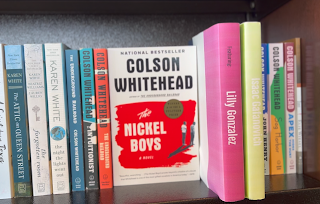
  Hi there! So, back to it! When we arrived at Barnes & Noble, it wasn’t hard to get back into the groove of things. It was just like filming the first time. We went back to our original filming location with ease and were able to get everything all setup. We took out a few books from the shelf that was behind Amelie the first day we filmed. It was so cool to replace the empty slot with something I had made just hours before. Obviously, the books I made were a little out of place mixed in with the professionally bound and published ones, but I must say, they looked very professional! We took a pan of the whole shelf and paused on our homemade books briefly. This way, the audience could read exactly what we were trying to highlight. It took a few takes. We went back and forth deciding how far the cinematographer should stand from the bookshelf for what effect we were going for. Of course, we had to make sure we were shooting in cinematic mode, on my phone. That way we could matc...
Prepping for Filming Day #2

Image
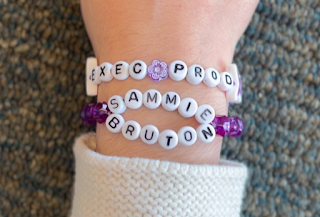
  Hey! So on Saturday, Amelie, Isaac, and Lilly visited my house. We met up at about 10:30 am. Amelie arrived at 10, so I showed her the props I had been working on the night before. They looked excellent! I “made” three books by printing out book jackets that would fit well. I also wrote a title on a Sharpie pen, as we had planned. But, it did not turn out at all how I had wanted it to. I was extremely disappointed. So, when Amelie got to my house, I asked her advice and we decided to make two friendship bracelets for the last needed title. They needed to describe that “Sammie Burton” was the executive producer. So we made one bracelet that said “EXEC PROD” which equated to “executive producer” and another one that had two layers. The top layer said “SAMMIE” and the bottom layer said “BURTON.” After spilling the beads a few times, which I was extremely frustrated with, I finished the bracelet! It was only when I put it on Amelie’s hand that I realized I had misspelled the name. In...

Start of Editing!

Image
Hey! So we’ve started to edit the footage for our final project. Even though we still have more filming to do, just so we know where we stand and what else we need to film. As I previously mentioned, I used “cinematic mode” on my iPhone to shoot our videos. While it looks so good, very high quality, this has proven to be an issue. It is extremely hard to export such footage, as it is so high in storage. I tried texting it to myself, emailing it, airdropping it. No technique I could think of seemed to work. I eventually asked my dad for help, and he came up with an idea. I felt kind of silly, it had been staring me right in the face: how to get footage from my phone onto my computer? Simply plug my phone into my computer! Of course! That proved to be extremely effective. I was able to make a folder filled with all of our footage up to this point.  Then, I imported each clip into the iMovie app on my computer. This is the third project for this class where I am using iMovie. Each tim...

More filming !

Image
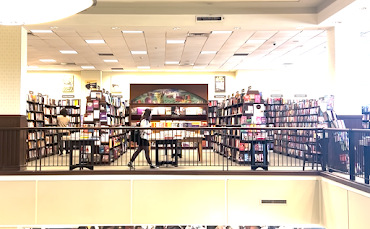
Hey there! Let’s get back to where we were. After Amelie was finished doing her makeup, we were ready to begin the actual filming process! The first few frames of our storyboard depicted Amelie walking through the bookstore, searching for a place to sit. We took a few medium shots at different places throughout the store. We tried to form a visible path she was following to the spot she would eventually wind up.  But then, I had the idea for an interesting wide shot. There are escalators in the middle of the store, so the second level forms a sort of two-sided balcony looking over the first floor. I thought that it would be a cool opportunity to shoot one side of the balcony, while standing on the other side. The shot looked so good! But we faced a problem: there were so many people around. It was almost humorous. I kept having to tell Amelie to back up and walk forward again. But eventually we went with one of the previous shots. After getting that shot, we moved on to a few track...

Beginning of Filming

Image
  Hi! We were finally able to start filming for our movie! There were so many days off of school all throughout January and the beginning of February. So, we made a plan to film on January 22, a teacher-work day, when we had off from school.  We quickly realized that was an unrealistic proposition. We had not yet made our storyboard, or any props. We could have gone anyway and improvised. Instead, we discussed in our group chat and made a unanimous decision to reschedule.  We rescheduled to February 1, an early release day. I drove Amelie, Isaac, Lilly, and myself to get lunch, and then to Barnes and Noble. We walked upstairs to the spot we envisioned. When we arrived, it was a lot different than we envisioned. They had moved a shelf of books so there was no longer anything placed in the upstairs corner of the store. We adapted, and instead decided to set up in front of a bookshelf. That bookshelf was facing a window, giving us a lot of natural light, which was necessary ...

Trying to get Music!

  Hey! Our group has done so much planning and we are finally ready to make moves! The first thing we started with on our final task was music. To start, we all looked through our Spotify playlists, trying to think of anything that would fit our movie. After some time, one of us finally suggested we use the Radiohead song, “Everything in Its Right Place.” It seemed like a perfect fit for our concept. And after talking to my dad about it, that was even more confirmed. The song was written to depict themes of depression, confusion, and trying to find a place in the world. There are very similar themes within our movie!  Amelie got to work right away, we found as many people related to Radiohead as possible. We reached out on every platform. This includes email, Instagram, and Twitter. After some waiting time, Amelie was written back! She got a message back from Colin Greenwood’s Instagram account. We couldn’t believe it! He said he would help us get the rights to the song for ou...

Storyboard - Final Task

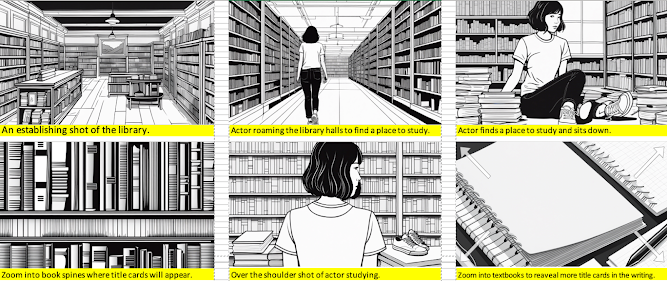
Image
An establishing shot of the library. Actor roaming the library halls to find a place to study.  Actor finds a place to study and sits down. Zoom into book spines where title cards will appear. Over the shoulder shot of actor studying. Zoom into textbooks to reveal more title cards in the writing. Shot of actor sitting among the growing books. A bookshelf where more title cards will appear. Actor starts to scribble on her books manically. Zoom into pencil with names on them. Acrot collecting herself from her thoughts. Zoom into weird symbols written on her notebook. Insert of 2 other actors speaking in distorted tongues. Zoom into the other actors books with title cards. Actor hears buzzing and static as she goes insane. Title card on a cup of coffee near her. Final shot of a book with "Migraine" scribbled on it. Pencil snaps on paper from the force and screen cuts to black.