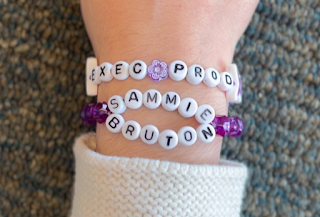
Hey again! To finish up filming, we had three more shots to get! Another book, showing “Written by”; the friendship bracelets, showing “Executive producer”; and a phone screen, showing “Music by.” We first took a shot of the book. We had already accounted for all the required shots in our movie, so we had some more freedom with this. We decided to play around with the Dutch angle. We removed some books from the shelf and placed one book, the subject of our shot. We placed it so that it was slanted, and diagonal compared to the top and bottom, horizontal lines of the bookshelf, and the side-to-side, vertical lines of the books. The shot started with the vertical lines vertical, the horizontal lines horizontal, and our book slanted - making it a bit challenging to read the title. As the shot progressed, I rotated the camera so the text on our book spine was legible. The other lines in the shot were now slanted - our book is now the only thing making sense in the shot’s contex...
Hey! So on Saturday, Amelie, Isaac, and Lilly visited my house. We met up at about 10:30 am. Amelie arrived at 10, so I showed her the props I had been working on the night before. They looked excellent! I “made” three books by printing out book jackets that would fit well. I also wrote a title on a Sharpie pen, as we had planned. But, it did not turn out at all how I had wanted it to. I was extremely disappointed. So, when Amelie got to my house, I asked her advice and we decided to make two friendship bracelets for the last needed title. They needed to describe that “Sammie Burton” was the executive producer. So we made one bracelet that said “EXEC PROD” which equated to “executive producer” and another one that had two layers. The top layer said “SAMMIE” and the bottom layer said “BURTON.” After spilling the beads a few times, which I was extremely frustrated with, I finished the bracelet! It was only when I put it on Amelie’s hand that I realized I had misspelled the name. In...
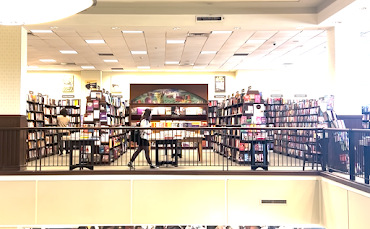
Hey there! Let’s get back to where we were. After Amelie was finished doing her makeup, we were ready to begin the actual filming process! The first few frames of our storyboard depicted Amelie walking through the bookstore, searching for a place to sit. We took a few medium shots at different places throughout the store. We tried to form a visible path she was following to the spot she would eventually wind up. But then, I had the idea for an interesting wide shot. There are escalators in the middle of the store, so the second level forms a sort of two-sided balcony looking over the first floor. I thought that it would be a cool opportunity to shoot one side of the balcony, while standing on the other side. The shot looked so good! But we faced a problem: there were so many people around. It was almost humorous. I kept having to tell Amelie to back up and walk forward again. But eventually we went with one of the previous shots. After getting that shot, we moved on to a few track...

Comments
Post a Comment